Cloud Computing Services for Small Business Growth
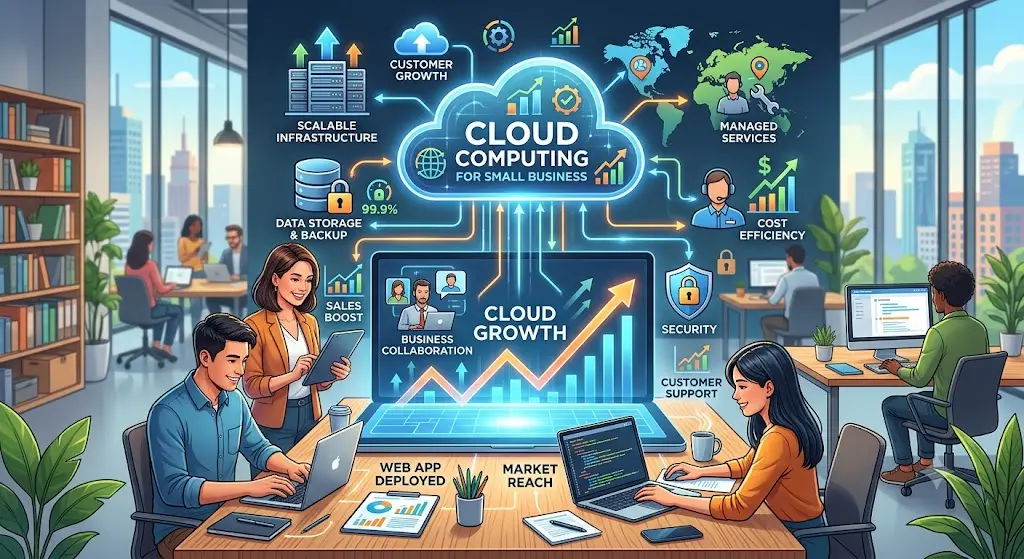
Cloud Computing Services for Small Business Growth: A Practical Guide for Owners Ready to Scale
Small businesses do not need enterprise-size budgets to use enterprise-level technology. Today, a local service company, online store, consultant, contractor, nonprofit, creator, or startup can use cloud computing services to run faster, protect data, automate daily tasks, serve customers better, and compete with larger companies.
The challenge is not whether cloud technology can help. The real challenge is knowing where to start, what to move first, what to automate, how to control costs, and how to choose tools that actually support business growth instead of creating more confusion.
This guide explains how cloud computing services for small business growth work in plain language. It is written for business owners who want better systems, faster websites, stronger security, reliable backups, and scalable digital tools without wasting money on technology they do not need.
What Are Cloud Computing Services for Small Businesses?
Cloud computing means using internet-based technology resources instead of relying only on one office computer, one physical server, or one local hard drive. Instead of storing everything in a single location, your business can use secure online platforms for websites, databases, email, backups, analytics, customer records, applications, file storage, automation, and collaboration.
Common cloud services include website hosting, cloud databases, customer relationship management systems, file storage, backup solutions, virtual servers, artificial intelligence tools, payment systems, analytics dashboards, and cybersecurity monitoring. Platforms like AWS, Microsoft Azure, Google Cloud, IBM Cloud, and other managed hosting providers give small businesses access to the same type of technology infrastructure used by major companies.
For a small business, the best cloud setup is not always the most complex setup. The best setup is the one that makes your business easier to manage, easier to find online, easier to protect, and easier to scale.
Why Small Businesses Are Moving to the Cloud
Small businesses move to the cloud because the old way of managing technology creates too many limits. Files get stuck on one device. Websites slow down when traffic grows. Customer information is scattered across emails, spreadsheets, and notebooks. Payments are disconnected from follow-up messages. Backups are forgotten until something breaks. Security becomes reactive instead of planned.
Cloud computing helps solve those problems by giving your business flexible systems that can grow with demand. A cloud-based website can be optimized for speed. A cloud database can store form submissions, customer inquiries, quote requests, product orders, and analytics. A cloud backup system can protect important files. AI automation can answer common customer questions, collect leads, and route inquiries while you focus on running the business.
Most importantly, cloud services help small businesses operate with more consistency. When your systems are connected, your team spends less time searching for information and more time serving customers.
The Biggest Benefits of Cloud Computing for Small Business Growth
1. Lower Upfront Technology Costs
Traditional technology often requires expensive hardware, licensing, maintenance, and replacement costs. Cloud services usually let small businesses start smaller and pay based on what they use. That does not mean every cloud bill is automatically cheap. Poor planning can still create waste. However, a well-designed cloud setup can reduce unnecessary hardware purchases and help owners match technology spending to real business needs.
For example, a small company may not need to buy a dedicated server just to run a website, store customer leads, or manage online forms. A cloud hosting plan, managed database, and secure backup workflow may be enough to support the business at a lower cost.
2. Better Website Performance and User Experience
Your website is often the first employee your customer meets. If it loads slowly, breaks on mobile, or makes it hard to request a quote, visitors leave before they understand what you offer. Cloud hosting, caching, image compression, content delivery networks, and clean code can all help improve website speed and reliability.
Better performance can also support search visibility because fast, stable, mobile-friendly pages create a better user experience. Business owners should pay attention to loading performance, interactivity, and layout stability. A site that feels smooth and trustworthy has a better chance of turning visitors into calls, forms, bookings, and purchases.
3. Stronger Security and Data Protection
Small businesses are often targeted because attackers assume they have weaker security. Cloud services can help improve protection with encryption, access control, multi-factor authentication, automated backups, logging, malware scanning, secure hosting, and regular updates.
Security should not be treated as a one-time setup. A better approach is to build a simple cloud security checklist: protect logins, update software, limit administrator access, back up important files, monitor suspicious activity, and document recovery steps. Even basic improvements can reduce risk and make the business more resilient.
4. Easier Remote Work and Team Collaboration
Cloud systems allow authorized team members to access the tools they need from approved devices and locations. This is useful for small businesses with contractors, remote staff, field workers, sales teams, or owners who manage operations while traveling.
Instead of emailing files back and forth, cloud collaboration tools can keep documents, project updates, customer notes, and reports in one organized place. That reduces confusion and helps everyone work from the same information.
5. Scalable Systems That Grow With Demand
A small business website might only get a few visits a day at first. Then a social media post, local campaign, Google ranking, or seasonal promotion can suddenly send more traffic. Cloud infrastructure makes it easier to scale hosting, storage, bandwidth, and applications when demand increases.
Scalability matters because growth should not break your systems. If your checkout, contact form, booking page, chatbot, or database fails during a busy period, you can lose leads and revenue. A scalable cloud plan helps your business prepare before the opportunity arrives.
Best Cloud Services to Start With
Small businesses do not need to move everything at once. The smartest strategy is to start with the areas that create the biggest business impact.
Cloud Website Hosting
A reliable website foundation should include secure hosting, HTTPS, backups, caching, compressed images, mobile-friendly layouts, and monitoring. For service businesses, your website should make it easy for visitors to understand your offer, see your services, request a quote, book a consultation, or buy a product.
Cloud Backup and Disaster Recovery
Every business needs a backup plan. Important documents, customer records, website files, databases, invoices, media assets, and business emails should not live in only one place. A simple backup strategy can include automated daily backups, separate storage locations, periodic restore testing, and clear recovery instructions.
Cloud Email and Productivity Tools
Professional email, shared calendars, document collaboration, and secure file storage help a business look more trustworthy and operate more efficiently. Using a business domain email address also improves credibility compared with relying only on a personal email account.
Customer Data and Lead Management
If your business receives leads from forms, phone calls, social media, email, and chat, you need a way to organize those opportunities. A cloud-based customer relationship management workflow can store leads, track follow-ups, segment customers, and reduce missed opportunities.
AI Chatbots and Automation
AI chatbots can help small businesses answer common questions, capture leads, recommend services, collect contact details, and guide visitors to the right page. The goal is not to replace human service. The goal is to support customers faster, especially after hours, while giving the owner better information to follow up.
How Cloud Computing Supports SEO and Organic Google Traffic
Cloud computing and SEO are connected because search performance depends on more than keywords. A strong organic search strategy needs useful content, fast pages, secure browsing, mobile usability, clean technical structure, optimized images, internal links, and clear calls to action.
Cloud hosting can improve uptime and reliability. Caching can make pages load faster. Image optimization can reduce page weight. Databases can power dynamic blogs, case studies, service pages, and product pages. Analytics tools can help you understand which pages get impressions, clicks, and conversions. Search Console can show what people are typing before they find your website.
For small businesses, long-tail blog posts are especially valuable. A broad keyword like “cloud computing” is extremely competitive. A long-tail keyword like “affordable cloud computing services for small business websites” is more specific and closer to buyer intent. Visitors searching that phrase usually have a clearer problem and are more likely to need help.
Long-Tail Keyword Opportunities for Small Business Cloud Services
Long-tail keywords work because they match real questions. Instead of writing only for generic terms, build content around the specific problems your customers are trying to solve.
- cloud computing services for small business growth
- affordable cloud consulting for small businesses
- cloud migration checklist for small business owners
- secure cloud backup solutions for small business
- AI automation and cloud services for small businesses
- Houston cloud computing consultant for small business
- how to move a small business website to the cloud
- best cloud services for local service businesses
- cloud hosting for small business websites
- managed IT and cloud support for small businesses
A strong content strategy turns each keyword into a helpful page. One blog post can explain cloud migration. Another can cover secure backups. Another can compare AWS and Azure for small businesses. Another can explain how AI chatbots capture leads. Together, those pages create topical authority and give Google more helpful content to understand what your business does.
A Simple Cloud Migration Checklist for Small Businesses
Before moving tools, files, or websites to the cloud, follow a simple checklist. This reduces risk and keeps the project focused.
Step 1: Identify the Business Goal
Do you want a faster website, better backups, easier remote work, stronger security, online payments, automated customer support, or better reporting? The goal determines the cloud solution.
Step 2: Audit Current Systems
List your website platform, hosting provider, email provider, databases, forms, payment tools, file storage, customer records, and business applications. Document what is working and what is causing problems.
Step 3: Prioritize High-Impact Moves
Start with the systems that affect revenue, leads, security, or customer experience. For many small businesses, that means the website, backups, contact forms, email, and customer follow-up workflow.
Step 4: Protect Data Before Changes
Create backups before migration. Confirm where files and databases are stored. Keep administrator access secure. Test the backup before relying on it.
Step 5: Test Before Launch
Before replacing an old system, test the new setup. Check website pages, forms, payment buttons, email delivery, mobile layouts, analytics, redirects, and security settings.
Step 6: Monitor and Improve
After launch, review performance, uptime, search impressions, clicks, form submissions, user behavior, and security alerts. Cloud migration is not just a technical move. It is the beginning of a better operating system for the business.
Common Cloud Mistakes Small Businesses Should Avoid
The biggest mistake is buying tools without a strategy. A business can end up paying for multiple platforms that do not connect, duplicate the same job, or create extra work. Another mistake is ignoring security settings. A cloud tool is only as safe as its configuration, passwords, permissions, updates, and backup plan.
Small businesses should also avoid moving too fast without documentation. Write down where your domain is registered, where your website is hosted, who has admin access, where backups are stored, which plugins or integrations are active, and how customers contact you. Documentation saves time when something breaks or when you hire help.
Finally, do not ignore the customer experience. Technology should make it easier for customers to take action. Every cloud improvement should support a business goal: faster quote requests, easier checkout, better support, stronger trust, or more qualified leads.
How to Choose the Right Cloud Consultant
The right cloud consultant should understand both technology and business outcomes. Small businesses need someone who can explain options clearly, recommend practical tools, protect the budget, and build systems that support growth.
Look for experience with website development, cloud platforms, databases, security, backups, SEO, analytics, automation, and performance optimization. A good consultant should be able to connect the technical work to real business results, such as better lead capture, faster pages, stronger reliability, and lower operational friction.
You do not need someone who makes the cloud sound complicated. You need someone who can make the cloud useful.
Final Thoughts: Cloud Computing Is a Growth Tool, Not Just an IT Upgrade
Cloud computing services can help small businesses work smarter, protect data, improve website performance, automate customer support, and create a stronger foundation for growth. The key is to start with the business goal, choose the right tools, secure the setup, and keep improving based on real results.
Whether you need a faster website, secure backups, AI chatbot integration, cloud migration, SEO improvements, or a better customer lead system, the cloud can help your business move from scattered tools to connected growth.
Ready to build a smarter technology foundation for your business? Book a free consultation with Cloud Technology Computing and get a practical cloud, website, AI, and SEO plan built around your goals.
Frequently Asked Questions
What is the best cloud service for a small business?
The best cloud service depends on your goal. A business that needs a faster website may start with cloud hosting and caching. A business worried about data loss should start with automated cloud backups. A business trying to capture more leads may benefit from CRM tools, forms, analytics, and an AI chatbot.
How much does cloud computing cost for a small business?
Cloud costs vary based on hosting, storage, traffic, applications, support, and security needs. Many small businesses can start with a simple monthly setup and expand as traffic, data, or automation needs grow. The most important step is choosing services that match actual business needs instead of paying for unused tools.
Can cloud computing help my website rank better on Google?
Cloud computing alone does not guarantee rankings, but it can support SEO by improving website speed, uptime, security, mobile performance, image delivery, content management, and analytics. Strong SEO still requires helpful content, keyword strategy, internal links, optimized titles, and consistent publishing.
Is cloud computing safe for small business data?
Cloud computing can be safe when configured correctly. Use strong passwords, multi-factor authentication, limited admin access, encryption, software updates, monitoring, and automated backups. Security depends on both the cloud provider and how the business manages access and settings.
Should I move everything to the cloud at once?
Most small businesses should move in phases. Start with the highest-impact systems, such as website hosting, backups, email, forms, customer data, or payment workflows. A phased approach reduces risk and makes it easier to test each improvement before moving to the next.
0 Comments
No comments yet. Be the first to comment.